 techruzz
CutMarkPro Review: The Ultimate Professional Card & Sticker Imposer Software for Print Shops
In the fast-paced world of print production, efficiency and precision are non-negotiable. Whether you are running a bustling print shop, working as a freelance graphic designer, or manufacturing custom labels, the final step before sending a design to the printer is often the most tedious: imposition. Manually adding crop marks, bleed settings, and arranging multiple designs on a single sheet is time-consuming and prone to costly, waste-inducing errors.
Enter CutMarkPro™ (often searched as Cut Mark Pro), the professional card and sticker imposer software designed to automate and perfect your print workflow. In this comprehensive guide, we will explore what CutMarkPro is, its standout features, who benefits most from it, and why it has quickly become an essential tool for print professionals worldwide.
What is CutMarkPro?
CutMarkPro is a specialized desktop software application built for Windows 10 and 11 that simplifies the creation of print-ready layouts. It acts as a powerful imposition tool, allowing users to take individual design files and automatically arrange them onto standard or custom paper sizes with professional-grade precision.
Unlike general-purpose graphic design software that requires manual tweaking of margins, guides, and duplicates, CutMarkPro is purpose-built specifically for print production. It handles the complex math of spacing, bleed, and crop mark generation instantly. From standard business cards and custom stickers to A4 flyers and wide-format roll paper banners, CutMarkPro ensures that every sheet is optimized for accurate cutting and trimming, minimizing paper waste and maximizing overall productivity.
Key Features That Revolutionize Print Production
To understand why CutMarkPro is generating significant buzz in the printing and design industry, let’s dive into its core, standout features:
1. Precision Crop and Bleed Marks
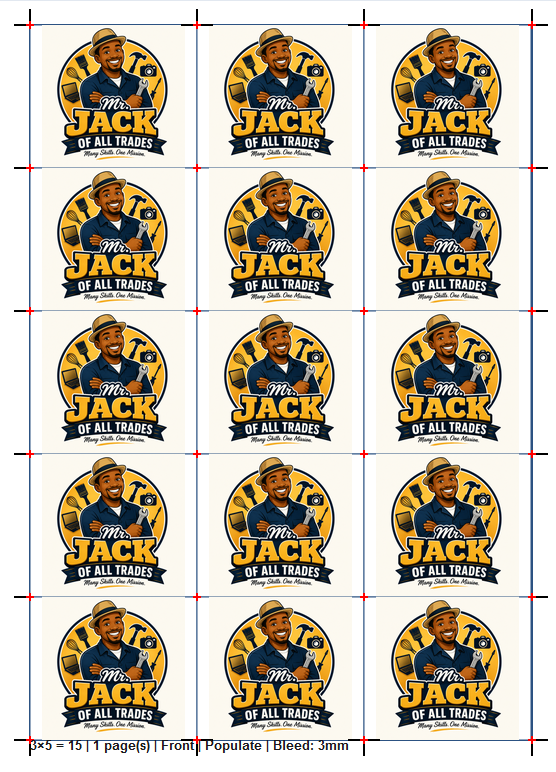
The hallmark of any professional print job is clean, accurate cutting. CutMarkPro automatically generates industry-standard crop marks and bleed areas, ensuring your designs extend perfectly to the edges without unwanted white borders or misaligned cuts.
2. Smart Layout Automation
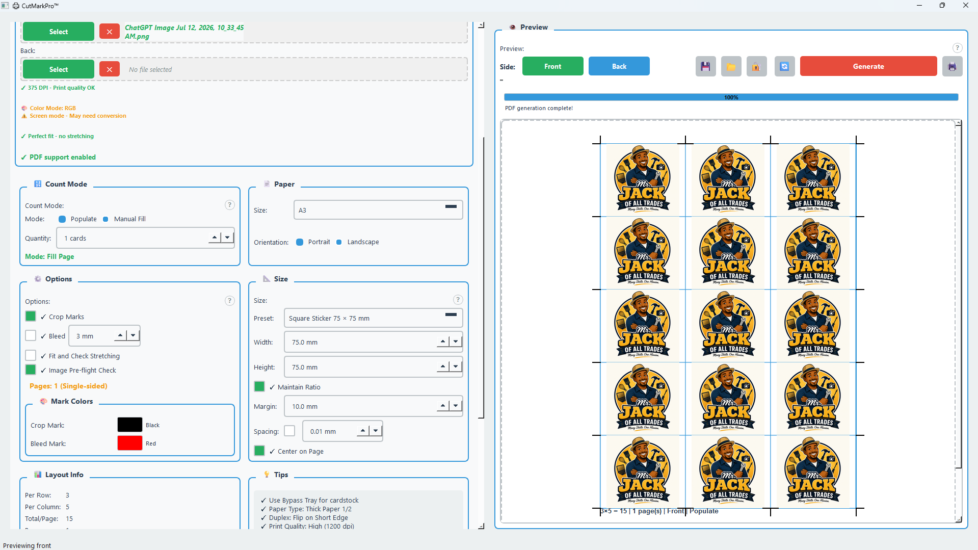
Say goodbye to manual duplication and alignment. The software’s intelligent algorithm automatically arranges your uploaded front and back design files onto the selected paper size, optimizing space and allowing for fully customizable spacing and margins.
3. Versatile Format Support
CutMarkPro supports a wide array of file formats. You can import your designs and export the final imposed sheets in high-resolution PDF, PNG, JPEG, or TIFF formats, maintaining up to 600 DPI for crisp, professional-grade printing.
4. Custom Size Flexibility
Whether you are printing standard US or EU business cards, round stickers, A5 flyers, or 60cm to 120cm roll paper banners, the software offers pre-set templates alongside fully customizable dimension controls to fit any niche print product.
5. Real-Time Live Preview
Mistakes are costly in print. CutMarkPro’s live preview feature lets you visualize the exact layout, spacing, and crop marks before generating the final output, giving you complete confidence and control before hitting “export.”
6. Secure Offline Licensing
For professionals concerned about cloud dependency or subscription fatigue, CutMarkPro offers a secure offline licensing system with hardware binding. This ensures your software is always available when you need it, even without an active internet connection.
Who Should Use CutMarkPro?
CutMarkPro is tailored for a specific set of professionals who demand reliability, speed, and accuracy in their print workflows:
- Print Shop Owners: Handle high-volume orders with ease. Automating the imposition process saves hours of manual labor per job, allowing your team to focus on customer service, quality control, and scaling the business.
- Graphic Designers: Deliver truly print-ready files to your clients or your local printer. Eliminate the frustrating back-and-forth corrections caused by missing bleeds, incorrect margins, or misplaced crop marks.
- Label and Sticker Manufacturers: Manage complex shapes and custom die-cut layouts efficiently. The dedicated roll paper support is particularly beneficial for continuous, high-volume print workflows.
- CutMarkPro Review: The Ultimate Professional Card & Sticker Imposer Software for Print Shops Produce professional-grade promotional materials, event badges, and business cards internally without needing to outsource to expensive third-party printers.
How CutMarkPro Streamlines Your Workflow
The true value of CutMarkPro lies in the time and money it saves. Consider a traditional workflow: a designer exports a single business card, opens a separate layout program, manually sets up a document with bleed, copies and pastes the design dozens of times, aligns guides, and exports a final PDF. This process can take 15–30 minutes per job and is highly susceptible to human error.
With CutMarkPro, this exact same task takes under two minutes. You simply select the product category, upload the front and back design files, choose the target paper size, set the desired count, and click export. The software handles the rest. This dramatic reduction in production time translates directly to higher profit margins and the ability to take on more client work without increasing operational overhead.
Pricing and Value Proposition
CutMarkPro offers highly accessible pricing tiers designed to scale seamlessly with your business needs:
- Free 14-Day Trial: Test all basic features with PDF export (includes a small watermark). No credit card is required, making it risk-free to evaluate.
- Professional License ($19/year): Unlocks all features, unlimited cards per sheet, roll paper support, and all export formats without watermarks. This is ideal for freelancers and small print shops.
- Enterprise License ($49/lifetime): The ultimate value proposition. Includes everything in the Professional tier, plus priority email support, full commercial use rights, multi-device activation, and early access to future updates (including upcoming macOS and Linux versions).
Backed by a robust 30-day money-back guarantee, the investment practically pays for itself within the first few client jobs.
Frequently Asked Questions (FAQ)
What operating systems does CutMarkPro support?
Currently, it is optimized for Windows 10 and 11. A macOS 10.15+ and Linux version is actively in development.
Can I use CutMarkPro for commercial client work?
Yes, both the Professional and Enterprise licenses include full commercial use rights, making it perfect for client work and print shop applications.
What is the maximum export resolution?
CutMarkPro supports high-resolution exports up to 600 DPI, ensuring top-tier print quality for even the most demanding professional printers.
Conclusion: Elevate Your Print Production Today
In an industry where margins are tight and quality expectations are higher than ever, CutMarkPro stands out as an indispensable asset. It removes the friction from print preparation, replacing tedious, error-prone manual layout tasks with a seamless, automated, and highly accurate process.
Whether you are printing a hundred business cards or a thousand custom die-cut stickers, CutMarkPro ensures your output is flawless, professional, and ready for the cutter every single time. Don’t let outdated, manual imposition methods hold your business back.
Ready to transform your print workflow? Download the free 14-day trial of CutMarkPro today and experience the difference professional-grade imposition software can make for your business.
Rate post